How to verify SWEAR is protecting our video assets?
In Short
The XProtect management client enables you to see how many cameras and hashes are being created each minute. Navigate to SWEAR > Certification Servers > select your server > Status tab.
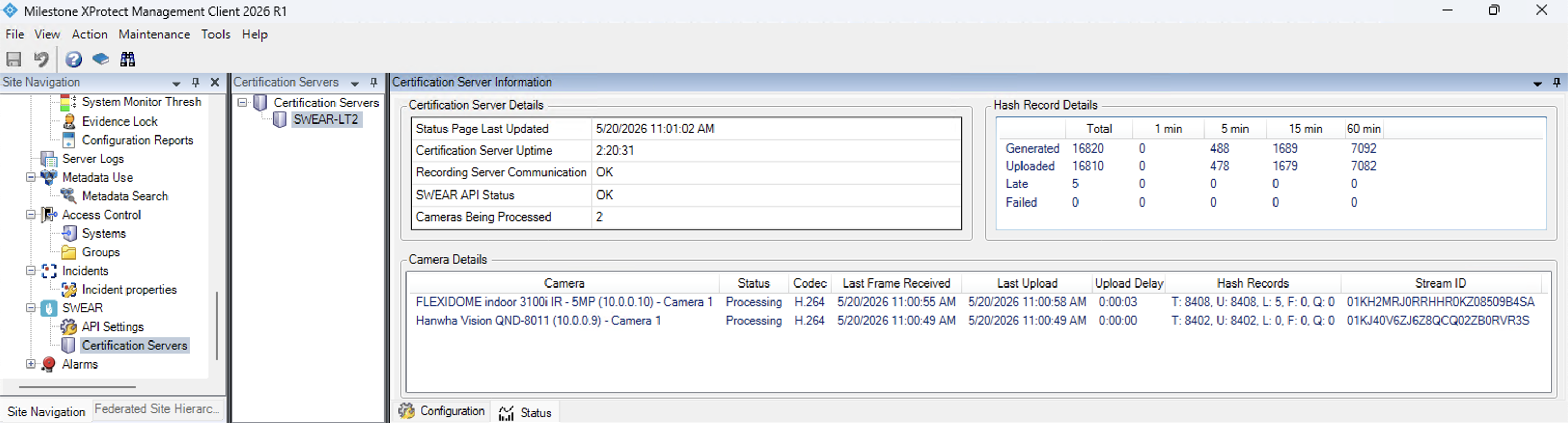
Explanation
Status Window Counters
| Counter | Meaning |
|---|---|
| T | Total hash records generated since service start |
| U | Hash records uploaded to ledger |
| L | Records marked late (upload delays) |
| F | Failed uploads |
| Q | Queue size (records pending upload) |
Normal Operation Indicators
- T and U both increase over time
- Both refresh every ~10 seconds
- Q stays stable or fluctuates within a small range
This confirms hashing and uploading are occurring but does not verify which specific cameras are protected.
Troubleshooting
Counters aren't updating
Check: - SWEAR service is running (restart if needed) - Configured cameras are operational - Network connectivity to upload destination - Monitor F and L for upload issues
F or L is increasing
Indicates upload pressure or connectivity issues. Verify network stability and service health; contact support if problems persist.
Interpreting counter trends
| Trend | Pattern |
|---|---|
| Healthy | T and U increasing, Q stable |
| Backlog | T increasing faster than U, Q growing |
| Failure | F increasing repeatedly, Q growing |
Additional Resources
- SWEAR Certification Server Information Pane in Milestone XProtect
- How does SWEAR integrate with Milestone?
- SWEAR Installation for Milestone XProtect
Still Need Help?
If the counters do not refresh or upload failures continue:
- Contact support and include a screenshot of the status window.
- Include current values for T, U, L, F, and Q.
- Note the time range observed and whether video was actively recording.