Milestone FAQs
Find quick answers to common questions about using SWEAR products.
Can’t find what you need? Search for it ↗
How does SWEAR integrate with Milestone?
SWEAR integrates with Milestone XProtect as a MIPS plug-in layer, not as a replacement for your VMS. Milestone continues to handle camera ingestion, recording, retention, playback, and operator workflows, while SWEAR adds continuous authenticity certification in parallel.
As video is recorded, SWEAR generates cryptographic hash records and preserves that evidence in a blockchain-backed ledger so footage can later be verified against its originally certified state. In practice, teams keep using Milestone as normal, but gain tamper-evident authenticity proof for protected cameras.
Does SWEAR impact Milestone VMS performance?
In normal operation, SWEAR does not materially impact Milestone recording, playback, or core storage workflows. SWEAR runs as a sidecar-style certification service: it reads recorded stream data, generates cryptographic hash records, and uploads only those compact records. It does not alter camera video, does not replace Milestone recording logic, and does not send raw video off-host.
At scale, runtime impact is typically low and predictable, with resource use driven mainly by the number of protected cameras and their bitrate. The most noticeable load is usually temporary, such as when the service catches up after downtime or when network/API interruptions create a queue backlog. With standard deployment settings and healthy connectivity, SWEAR stays near steady state and operates with minimal operational disruption.
How do I know if SWEAR is hashing and protecting video in the blockchain ledger?
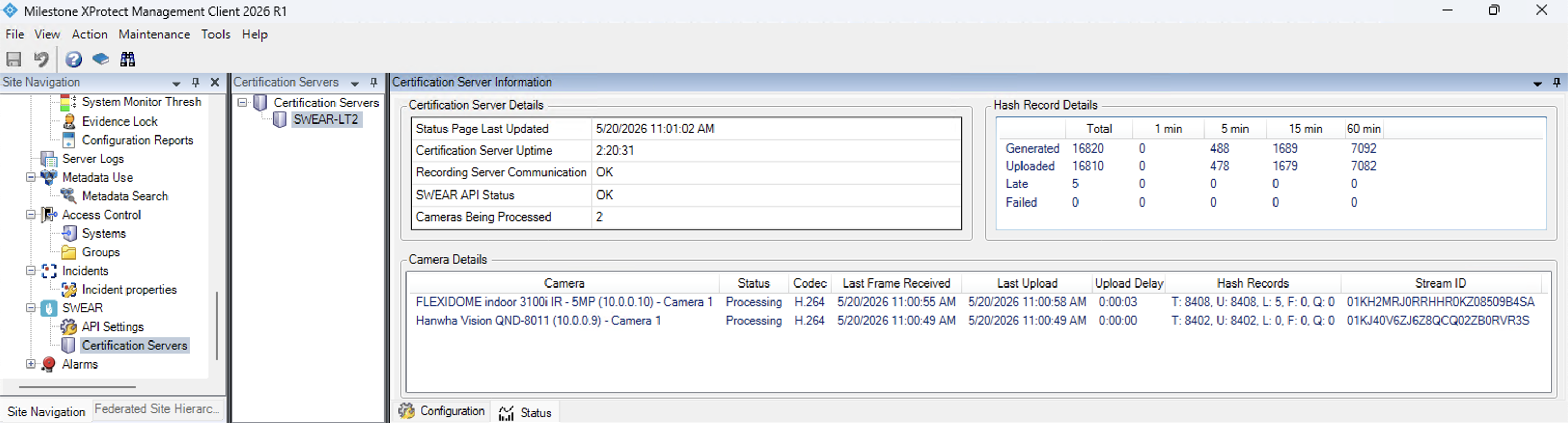
Watch the status window counters to confirm SWEAR is working. Navigate to SWEAR > Certification Servers > select your server > Status tab. If T and U update every ~10 seconds, hashing and uploading are active.
Why is my exported video not validating?
Validation failures usually happen because the exported file is no longer an exact match to the original SWEAR-protected recording. In Milestone, this most commonly occurs when privacy masks are embedded during export. The exported file is still usable for playback, but from a certification perspective, embedded masks alter pixel data and break the hash match SWEAR expects.
Validation can also fail or show partial results when the selected time range includes video that was never protected, was not recorded, or was modified after recording. To get a valid result, export only the exact protected interval, confirm the camera is enrolled in the SWEAR Certification Service, avoid content-altering export options.
SWEAR Plugin Tab Missing in Milestone Export
When the SWEAR Plugin tab is missing in a Milestone export, the most common cause is Windows trust blocking on exported files, especially after download, ZIP extraction, or transfer from another machine. Running the export from a network path, mapped drive, or remote location can trigger the same plugin-load restrictions. Validation inside the installed Smart Client is not affected; this issue is specific to the standalone export player environment.
Critical checks are to run the export only from a local drive, unblock the full export file set (not just SwearPlugin.dll), and launch via SmartClient-Player.exe instead of opening an .scp file.
