All FAQs
Comparisons FAQs
How does SWEAR compare to ONVIF and C2PA?
ONVIF (Open Network Video Interface Forum) and C2PA (Coalition for Content Provenance and Authenticity) are separate initiatives with different origins and scopes, and they have formed a strategic collaboration around digital video trust. In that collaboration, provenance is generally carried with the media asset, while SWEAR anchors proof independently outside the asset.
General FAQs
How does SWEAR work?
SWEAR establishes an AI-proof security layer for video evidence by creating an independent chain-of-custody that begins at the moment of capture and persists until it is needed in a courtroom, compliance, audits, or claims. SWEAR does this with a technique called Digital DNA Mapping that cryptographically hashes recordings, frame-by-frame, during recording...not after. Simultaneously, SWEAR then stores the hashes in an independent ledger that is then secured by a globally distributed blockchain network.
Later, when the authenticity of a video needs to be validated, SWEAR recreates the cryptographic hashes and compares them to the original hashes that were protected by the blockchain-backed ledger.
Why does SWEAR protect hashes with blockchain?
SWEAR is creating AI-resistant recordings. This requires a technology that can withstand advances in AI media manipulation tools. SWEAR utilizes the most powerful data integrity technology to protect the authenticity of data: a global blockchain network. By distributing hashes across thousands of servers, SWEAR insures that nobody can modify or manipulate the protective hashes.
Can SWEAR protect older digital recordings?
No. If a recording is not protected by SWEAR when it is created, there is no way to know if it has been modified.
Are the Authenticity Score and Time Score related?
No. These scores are independent and measure different things.
What data is contained in the cryptographic hashes?
Irreversible mathematical representations of camera footage.
How does SWEAR impact my environment?
SWEAR has a light footprint in your environment. No additional storage is needed and less than 1MB of hash data per hour per camera is sent to the SWEAR ledgers.
Milestone FAQs
How does SWEAR integrate with Milestone?
SWEAR runs as a Milestone approved plug-in for XProtect.
As security video footage is received by XProtect, SWEAR runs in parallel to establish an independent chain-of-evidence. This happens by simultaneously generating cryptographic hashes and sending the hashes to a remote blockchain-backed ledger.
Does SWEAR impact XProtect’s performance?
SWEAR’s impact on your XProtect environment is minimal.
SWEAR’s hashing of security videos does not modify or alter any of your recordings and has minimal impact on XProtect servers’ processors and memory usage. Bandwidth usage of the SWEAR system creates about a half of megabyte of hashes for each hour of video per camera and then sends those hashes to blockchain-backed ledger.
How to verify SWEAR is protecting our video assets?
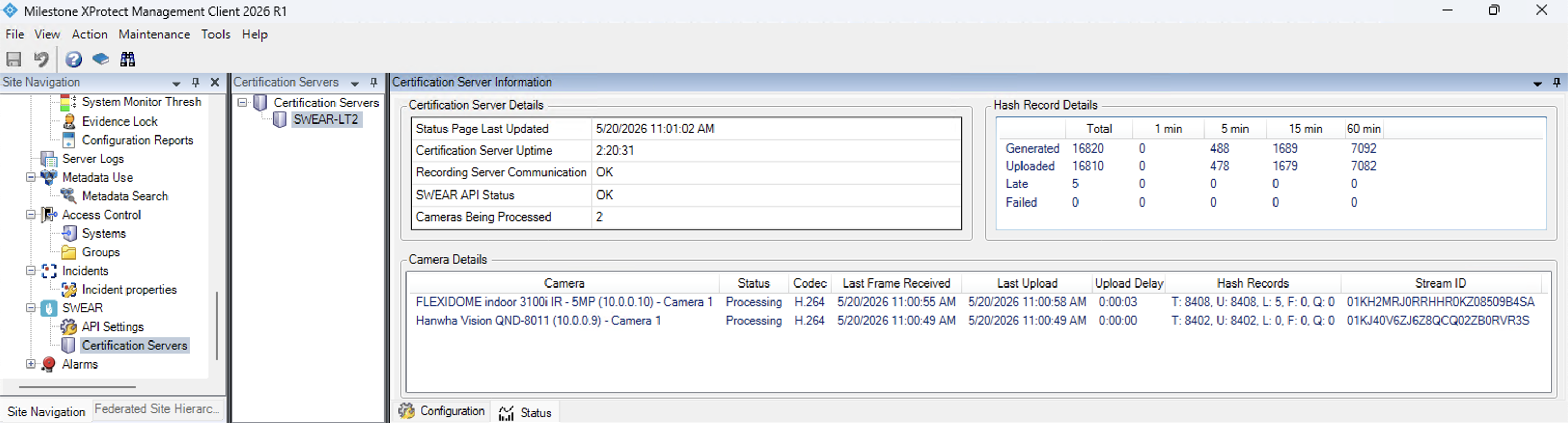
The XProtect management client enables you to see how many cameras and hashes are being created each minute. Navigate to SWEAR > Certification Servers > select your server > Status tab.
Why is my exported video not validating?
A video can appear not to validate by SWEAR for one of three reasons:
- The video you are trying to validate was not protected by SWEAR during the time frame you selected.
- A 3rd party feature has modified the recording or layered something onto the video.
- The video has been modified.
Why is the SWEAR tab missing in a Milestone export
Some unzipping tools do not properly work with XProtect zipped files. WinRAR properly unzips XProtect files.