How do I know if SWEAR is hashing and protecting video in the blockchain ledger?
In Short
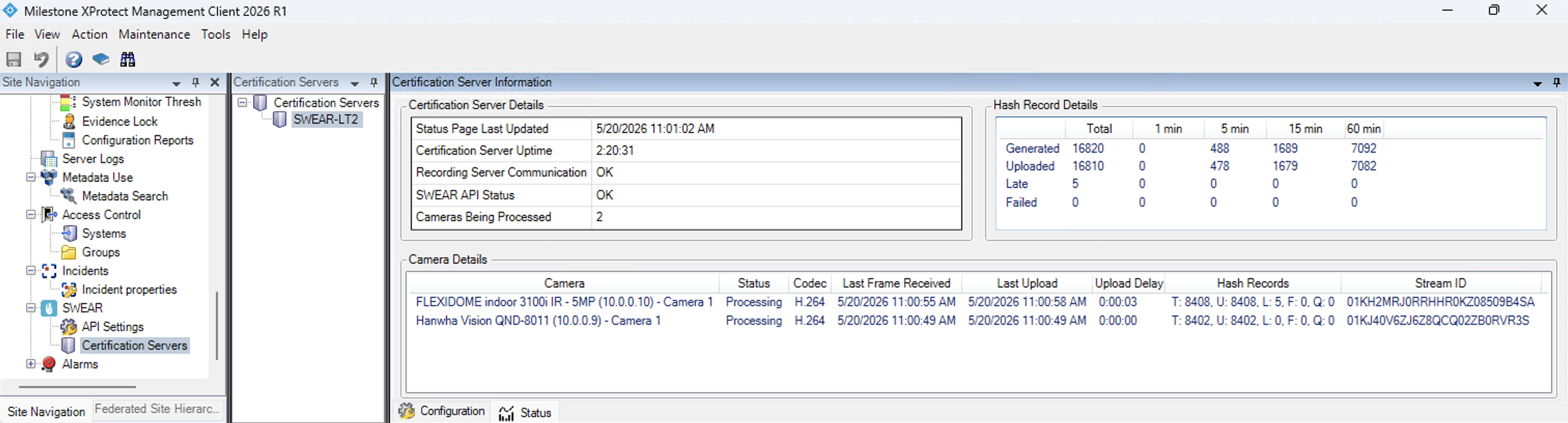
Watch the status window counters to confirm SWEAR is working. Navigate to SWEAR > Certification Servers > select your server > Status tab. If T and U update every ~10 seconds, hashing and uploading are active.
Explanation
Status Window Counters
| Counter | Meaning |
|---|---|
| T | Total hash records generated since service start |
| U | Hash records uploaded to ledger |
| L | Records marked late (upload delays) |
| F | Failed uploads |
| Q | Queue size (records pending upload) |
Normal Operation Indicators
- T and U both increase over time
- Both refresh every ~10 seconds
- Q stays stable or fluctuates within a small range
This confirms hashing and uploading are occurring but does not verify which specific cameras are protected.
Troubleshooting
Counters aren't updating
Check: - SWEAR service is running (restart if needed) - Configured cameras are operational - Network connectivity to upload destination - Monitor F and L for upload issues
F or L is increasing
Indicates upload pressure or connectivity issues. Verify network stability and service health; contact support if problems persist.
Interpreting counter trends
| Trend | Pattern |
|---|---|
| Healthy | T and U increasing, Q stable |
| Backlog | T increasing faster than U, Q growing |
| Failure | F increasing repeatedly, Q growing |
Additional Resources
- SWEAR Certification Server Information Pane in Milestone XProtect
- How does SWEAR integrate with Milestone?
- SWEAR Installation for Milestone XProtect
Still Need Help?
If the counters do not refresh or upload failures continue:
- Contact support and include a screenshot of the status window.
- Include current values for T, U, L, F, and Q.
- Note the time range observed and whether video was actively recording.
Last updated: 2026-05-20